Sound like you've got this.
In every call.
VoicePress is a virtual microphone for macOS. It runs your voice through a broadcast-style compressor, live. You come across full, steady and sure of yourself in Zoom, Meet, Teams, Loom, OBS, or any app with a microphone.
🔊 73 seconds, no cuts. First my Mac's built-in mic, raw. Then the Compression knob goes up and you hear it change, live. Second half: a Rode studio mic through a Steinberg USB interface. Good mic, still a big difference.
Get VoicePress: $19 one-time
One year of updates included. No subscription. You get:
- The app today: signed & notarized installer. Pick “VoicePress” as your mic in Zoom, Teams, Loom or any other app.
- One year of updates from the day you buy. The app keeps working after that, nothing renews on its own.
- Setup help by email, from me. There's one Zoom setting that kills it, the app shows you which.
Before you buy: Apple Silicon Mac (M1 or later), macOS 13 or newer. The current installer does not support Intel Macs, Windows, iPhone or iPad.
Buy VoicePress for $19 One-time payment in USD via Polar · no subscription · 14-day refund · not ready yet? Join the free waitlist below.Prefer a pure A/B? Same take from a MacBook's built-in mic, raw vs. VoicePress.
Recorded on a MacBook's built-in microphone in a normal room, no external gear. Processed at the everyday setting, “Reduce Echo & Noise” on. No AI resynthesis: your voice stays yours.
Rather hear your own voice? Record six seconds right here in the browser and compare. Try it with your mic →
“Doesn't Zoom already clean my audio?”
It removes background noise, and post-production AI like Adobe Podcast Enhance cleans a recording after the fact. Both take away what's bad. Neither adds what makes a voice carry: fullness, steadiness, presence. That's compression, and it only helps if it happens live, while you speak.
Swipe the table to compare all three options.
| Noise removal built into Zoom & Teams | Post-production AI e.g. Adobe Podcast | VoicePress | |
|---|---|---|---|
| Works live, while you speak | ✓ | – | ✓ |
| Removes background noise | ✓ | ✓ | ✓ |
| Reduces room echo | Teams only | ✓ | ✓ |
| Broadcast-style compression: full, steady, confident | – | – | ✓ |
| Works in every app: calls and recordings | – | – | ✓ |
Cleanup tools are great at what they do. VoicePress is built for the moment you're actually speaking, and works alongside them. Teams applies some echo reduction inside its own calls; Zoom doesn't, and neither works in recordings or other apps.
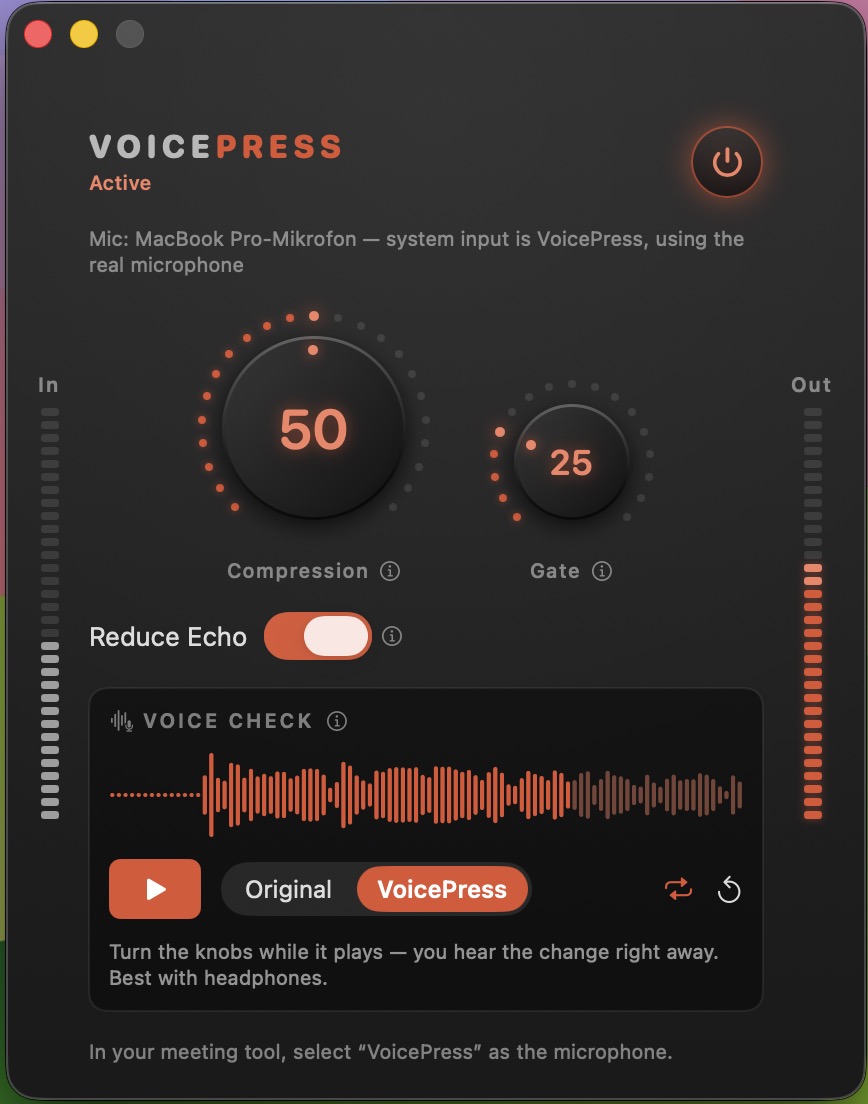
The whole app. Two knobs, echo & noise reduction, and a Voice Check that lets you hear yourself the way others hear you, before you join the call.
Questions
Does it add delay to my voice?
A few hundredths of a second, a little more with “Reduce Echo & Noise” on. Nobody on the call notices, and your lips stay in sync on video.
Which apps does it work with?
Any app that lets you pick a microphone: Zoom, Teams, Meet, Loom, OBS, QuickTime, Voice Memos and so on. You select “VoicePress” instead of your usual mic, once.
Does my audio leave my Mac?
No. All processing runs locally on your Mac. No account, no cloud, no recording. The app only goes online to check whether an update is available.
Does it work with AirPods or a good studio mic?
Yes to both. The demo video shows a studio mic in the second half. AirPods already process your voice on their own, so try them with “Reduce Echo & Noise” off first and let the built-in Voice Check decide.
What happens after the first year?
The app keeps working exactly as before. Nothing renews and nothing gets charged. You just stop receiving new versions unless you decide to extend.
Can I get a refund?
Yes. If VoicePress doesn't work for you, email support@voicepress.io within 14 days of your purchase and you get your money back.
Who handles the payment?
Checkout runs through Polar, which acts as the reseller: they process the payment and send your receipt and invoice. After paying you land on a page with the download and setup steps.
Intel Mac, Windows, iPhone?
Not yet. The current version needs an Apple Silicon Mac (M1 or later) with macOS 13 or newer. Join the waitlist below and you get one email when that changes.